

Description
Download Nuke Anything Enhanced – remove unwanted objects, clean web pages, Firefox add‑on
Introduction: Why a “nuke” tool is essential for modern browsing
The internet is a visual jungle. While many sites deliver valuable content, countless pages are littered with intrusive banners, animated GIFs, oversized images, and other visual noise that distracts from the core message. For users who rely on Firefox as their primary browser, the frustration of constantly closing pop‑ups or scrolling past endless clutter can turn a simple research session into a tedious chore. Nuke Anything Enhanced answers that pain point by giving you direct control over what appears on a page. Integrated into the right‑click context menu, the extension lets you instantly erase any element you find unsightly—whether it’s a banner ad, a side‑panel, or an oversized image. The changes are temporary in the browser view but persist when you print or save the page, helping you conserve ink, paper, and mental bandwidth. Because the tool works locally, it does not send your browsing data to external servers, keeping the experience both secure and private. In this review we’ll explore how Nuke Anything Enhanced improves readability, saves resources, and stays lightweight, all while remaining completely free for Firefox users on Windows, macOS, and Linux.
Core Features of Nuke Anything Enhanced
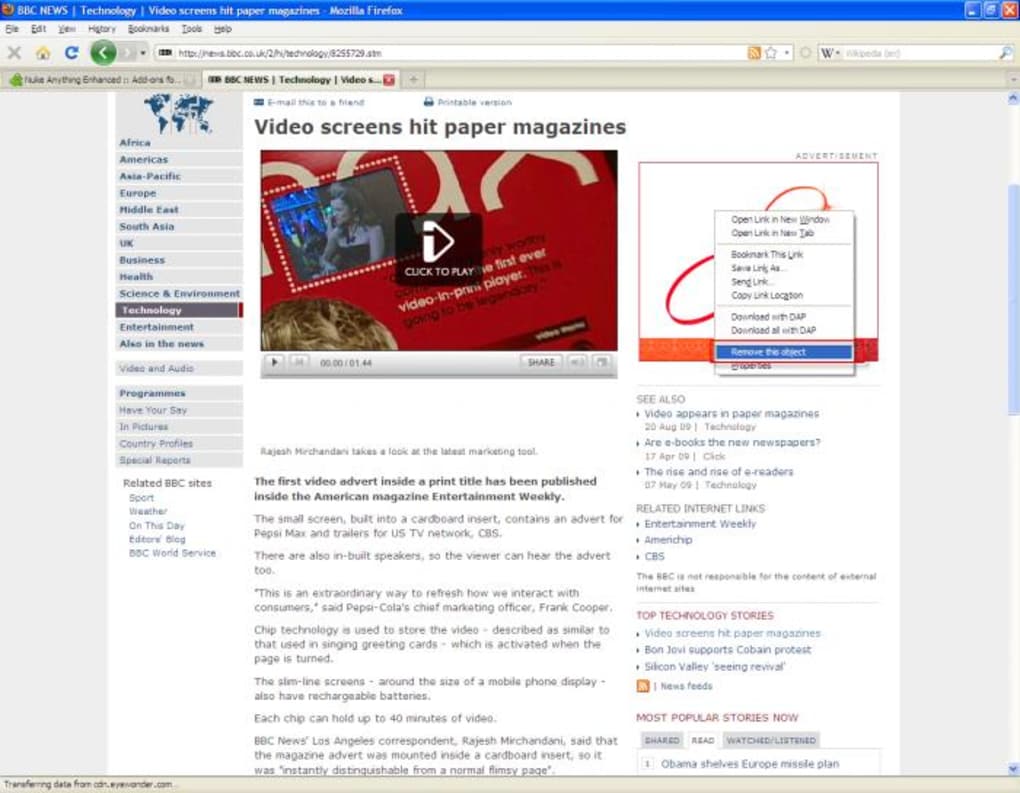
- Context‑menu removal: Right‑click any element and choose “Remove this object” for instant deletion.
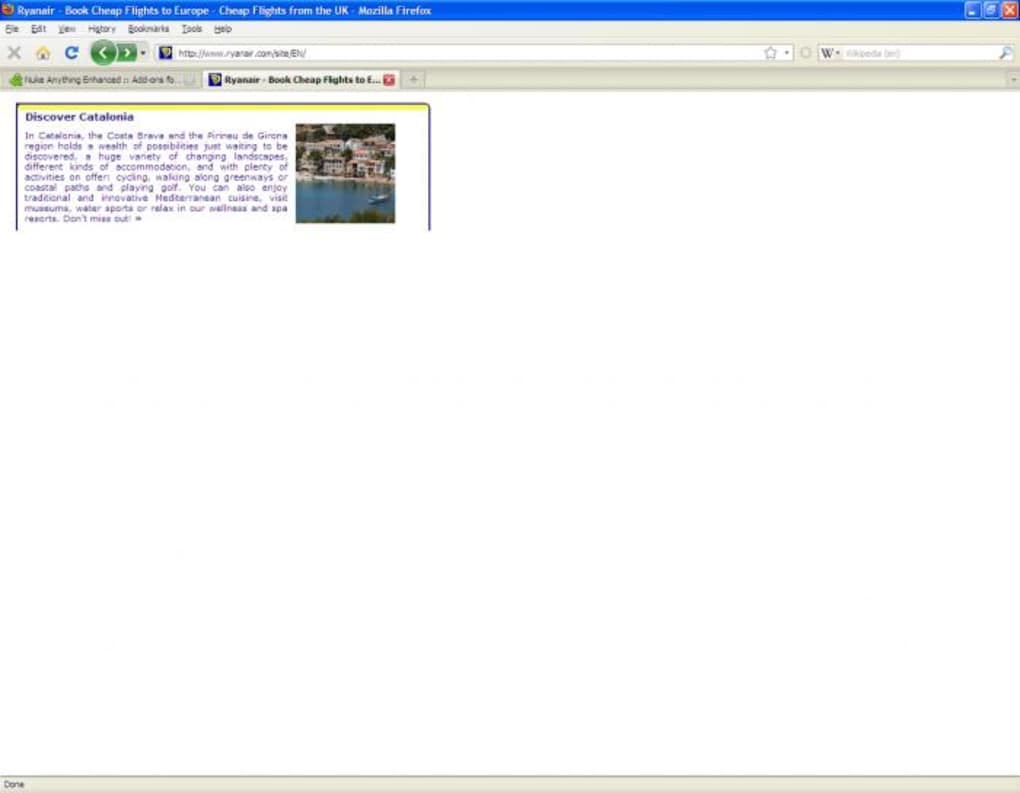
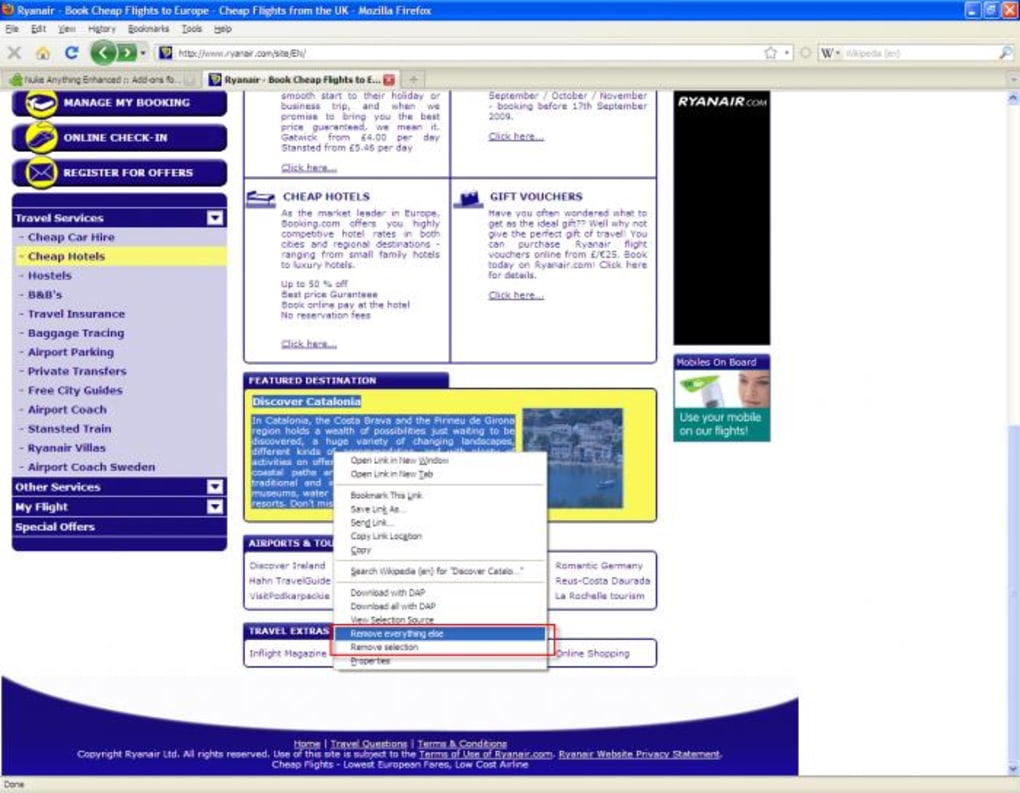
- Batch operations: Select multiple elements, then use “Remove selection” or “Remove everything else” to clean up large sections of a page.
- Undo support: A single‑click “Undo last removal” restores the most recently deleted object, helping avoid accidental deletions.
- Persistent changes for printing: Removed items stay hidden when you print or export the page to PDF, reducing ink usage and page count.
- Lightweight design: The extension adds less than 100 KB to Firefox’s memory footprint and does not impact page‑load speed.
- Cross‑site compatibility: Works on most HTML‑based sites, including news portals, blogs, and documentation sites.
- Non‑intrusive operation: All changes are client‑side only; no data is transmitted to third‑party servers.
- Easy toggle: Disable the add‑on with a single click in the Firefox toolbar if you need to revert to the original view.
While the tool handles the majority of HTML elements, it does have a limitation with Flash‑based ads and certain dynamically generated scripts that embed themselves after the initial page load. Nevertheless, the feature set provides a robust solution for everyday browsing, especially for users who need a clean reading environment without installing heavyweight ad‑blockers. The combination of real‑time removal and persistent printing support makes Nuke Anything Enhanced a unique addition to the Firefox add‑on ecosystem.
Installation, Configuration & Compatibility
Getting Nuke Anything Enhanced up and running is straightforward. First, open Firefox and navigate to the official Mozilla Add‑Ons page. Click the “Add to Firefox” button, confirm the permission request, and the extension will install automatically. After a brief reload of the browser, you’ll notice a small “Nuke” icon appear next to the address bar, indicating that the add‑on is active.
Configuration is minimal by design. By default, the extension is ready to use immediately, but you can customize its behavior in the Add‑Ons Manager under the “Preferences” tab. Options include toggling the “Undo” shortcut, enabling a keyboard shortcut for rapid removal, and choosing whether removed elements should be hidden permanently in the current session or only for printing.
The add‑on is compatible with all desktop operating systems that support Firefox, namely Windows 10/11, macOS 10.15+ and Linux distributions. Mobile versions of Firefox do not currently support this extension, as the context‑menu architecture differs significantly on iOS and Android. For users on those platforms, the functionality is limited to the desktop environment, but the extension’s lightweight nature means it won’t slow down older machines either.
After installation, you can test the tool by visiting any content‑heavy site (e.g., a news article with sidebars). Right‑click an unwanted banner and select “Remove this object.” The element disappears instantly. To verify persistence, use the browser’s “Print” preview; the removed item will not appear in the output. If you ever need to revert, simply press Ctrl+Z (or use the toolbar button) to undo the last removal.
Pros, Cons, and Frequently Asked Questions
Pros
- Instant removal of unwanted page elements without page reload.
- Preserves a clean layout for printing and PDF export.
- Minimal impact on browser performance and memory usage.
- Free, open‑source, and regularly updated through Mozilla’s add‑on repository.
- Works on the vast majority of HTML‑based sites.
Cons
- Cannot remove Flash‑based ads or certain dynamically injected scripts.
- No support for Firefox on mobile devices (iOS/Android).
- Selections cannot be undone once removed (only the last single object can be undone).
Frequently Asked Questions
Is Nuke Anything Enhanced completely free?
Yes, the extension is free to download and use. It is distributed through Mozilla’s official add‑on store with no hidden fees or subscription requirements.
Will using the extension affect my browsing speed?
No. Nuke Anything Enhanced runs client‑side and only modifies the DOM after the page has loaded, so it does not add any noticeable latency to page rendering.
Can I remove multiple elements at once?
Yes. By holding the Ctrl (or Cmd on macOS) key while selecting elements, you can right‑click and choose “Remove selection” or “Remove everything else” to clean up large sections quickly.
Does the extension store any of my browsing data?
No. All changes are performed locally in your browser. The extension does not transmit any information to external servers, preserving your privacy.
Will removed elements reappear after I refresh the page?
Yes, the removal is temporary for the live view. Refreshing the page restores the original content, but the changes remain for any printed or saved version of the page.
Overall, Nuke Anything Enhanced provides a practical, low‑overhead solution for anyone tired of visual clutter while browsing. Its seamless integration with Firefox’s context menu and the ability to keep pages clean for printing make it a valuable addition to the browser’s toolbox. While it falls short on Flash‑based content and mobile support, the benefits far outweigh these minor limitations.
Conclusion & Call to Action
If you spend a significant amount of time reading articles, researching topics, or printing web pages, Nuke Anything Enhanced is the lightweight companion your Firefox browser has been missing. By empowering you to eliminate distracting elements with a single click, the add‑on not only improves readability but also helps you save ink, paper, and digital bandwidth. Installation takes seconds, the interface is intuitive, and the extension remains completely free and secure. For a cleaner, more focused browsing experience, click the link below to add Nuke Anything Enhanced to your Firefox installation today.
Download Nuke Anything Enhanced now and start browsing without the clutter.
Guides & Tutorials for Nuke Anything Enhanced
How to install Nuke Anything Enhanced
- Click the Preview / Download button above.
- Once redirected, accept the terms and click Install.
- Wait for the Nuke Anything Enhanced download to finish on your device.
How to use Nuke Anything Enhanced
This software is primarily used for its core features described above. Open the app after installation to explore its capabilities.
User Reviews for Nuke Anything Enhanced 0
No reviews found





